
Windows USB power settings
If your keyboard stops working after your computer wakes from sleep, Windows may be turning off power to your USB ports to save energy. Turning off this power-saving option for the USB Root Hub can help.
Change the Power Management Setting for the USB Root Hub
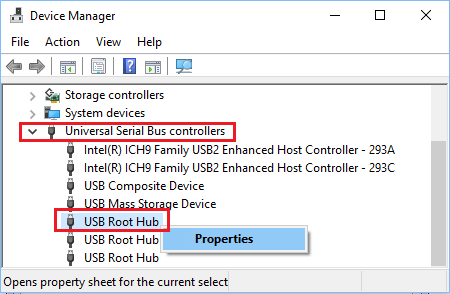
Right-click the Start button and select Device Manager in the WinX menu. On the Device Manager screen, expand the Universal Serial Bus Controllers entry, right-click USB Root Hub, and click Properties.
On the USB Root Hub Properties screen, switch to the Power Management tab, uncheck the "Allow the computer to turn off this device to save power" option, and click OK.
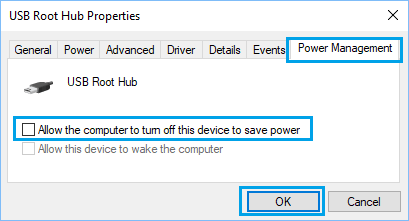
If there are multiple USB Root Hubs, repeat the above steps for each of them.
For related power settings, such as USB Selective Suspend, see our article "(Windows) Keyboard Will Not Wake From Sleep."
If this does not solve the problem, please submit a ticket through our help desk at: Open a technical support ticket
Give feedback