
Toggling Scroll Lock on your Das Keyboard
Toggling Scroll Lock
For this article, keys and key combinations will be represented by bold italics, unless specifically referred to as a key.
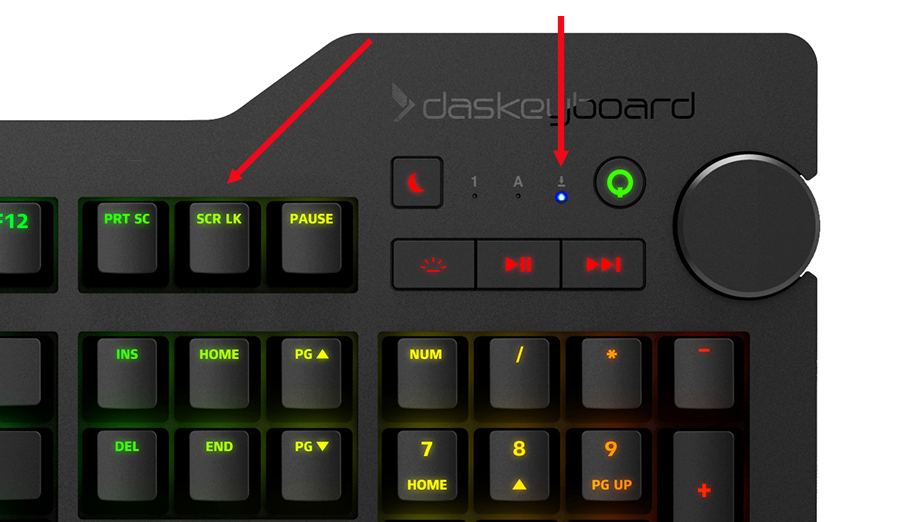
The Scroll Lock key can be found on the Das Keyboard 4C TKL, 5Q, 5QS, 4Q, X50Q, 4 Professional, 4 Ultimate, 4 root, Model S, and Prime 13 models. On most models, you can turn it on by pressing the "Scr Lk" key, located between the Prt Sc and Pause keys. When you press this key, an LED light will light up by the ⤓ symbol.
Scroll Lock is typically used by people who frequently use Microsoft Excel. When Scroll Lock is off and you are using Excel, the arrow keys will highlight an adjacent cell, but when you turn it on, the arrow keys will instead scroll through the entire worksheet.
Others have also been known to use Scroll Lock as a free key for a macro, or as a hotkey to switch their keyboard between two computers or devices.
Here is the exact placement of the Scroll Lock indicator light, pictured on the 4Q.
Attachments
Give feedback